
Texture Size Checker
Checking texture dimensions is a small task that becomes repetitive when a project contains many images. Opening each file individually takes time, and an incorrectly sized texture can be easy to miss. I built Texture Size Checker to help artists, check a folder of textures against a project’s size requirements before delivery.
The tool scans images in a selected folder and its subfolders, then displays which files pass, fail, or cannot be read.
How It Works
Texture Size Checker uses Python, PySide6 for its interface, and Pillow to read image dimensions. It supports PNG, JPG, and JPEG files.
Artists select the allowed sizes using four checkboxes: 512, 1K, 2K, and 4K. After clicking Choose a Folder, the tool checks each supported image against two conditions:
The image must be square.
Its width and height must match one of the selected sizes.
For example, a 2048 × 2048 textures pass when 2K is selected. A 512 × 300 texture fails because it is not square, even if 512 is an allowed size.
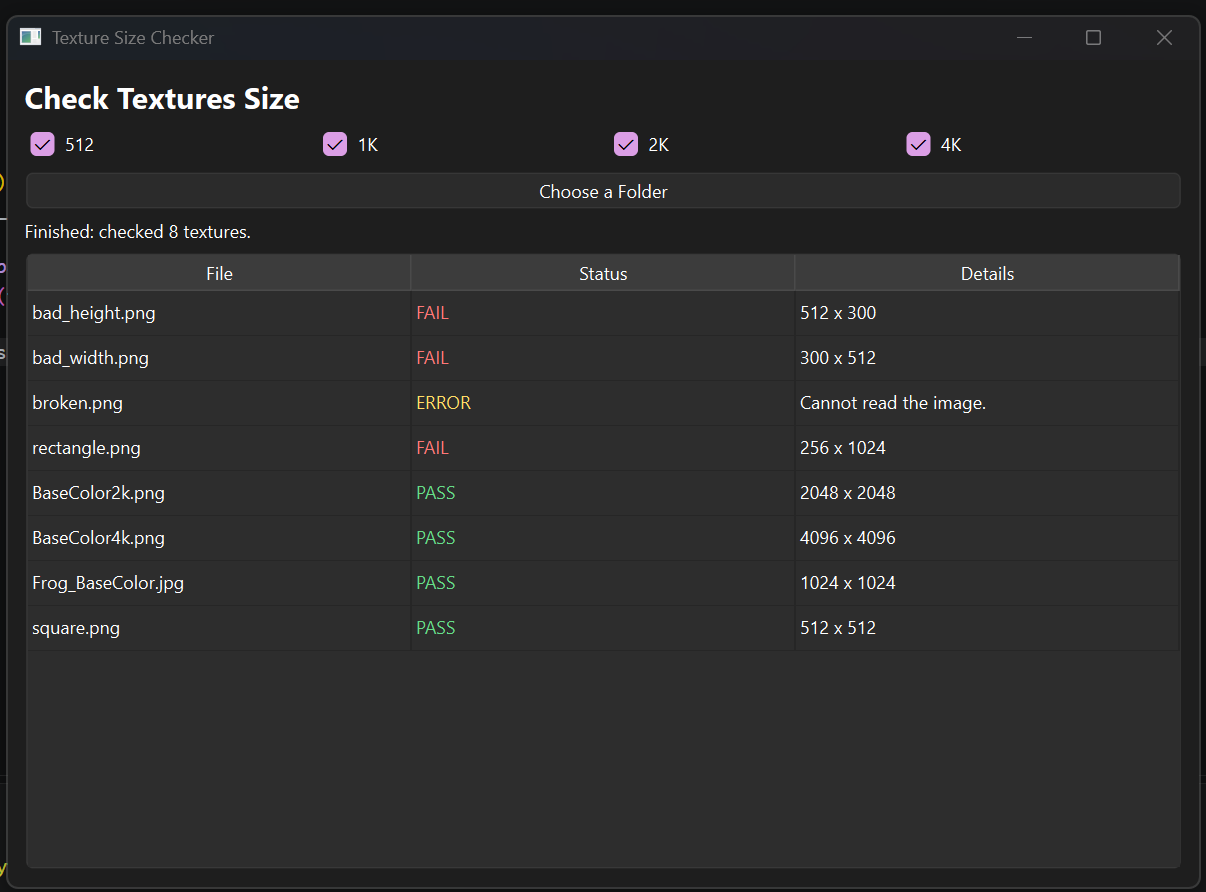
The results use three color-coded labels:
PASS — green | The image meets the selected size requirements.
FAIL — red | The image is readable but does not meet those requirements.
ERROR — yellow | The image cannot be opened or read.
Separating FAIL from ERROR helps identify the next step: an image with incorrect dimensions needs a different fix from a file that cannot be read.
Testing the Checker
I tested the tool with all four allowed sizes selected. The sample files included square textures, rectangular images, and an intentionally invalid image file.
Current Limitations
The checker focuses on dimensions and whether Pillow can read a file. It does not evaluate visual quality or color space, so artists still need to review those separately.
The current version supports only PNG, JPG, and JPEG files. Large folders may also make the window temporarily unresponsive while scanning. At least one size must be selected, and changing the allowed sizes requires choosing the folder again to run another check.
What I Learned
This project shows how a focused tool can turn a repetitive review task into a more consistent process. The checking rule is simple, but presenting the results clearly matters: artists need to understand both which files need attention and why.
Possible next improvements include keeping the interface responsive during larger scans and adding a way to rerun a check without selecting the folder again. For now, Texture Size Checker provides a focused step in preparing textures for delivery.
