
USD Prop Randomizer
Artists often reuse models such as grass, flowers, and bowls to build a scene. When every copy has the same scale and rotation, the scene can look repetitive. Adjusting each object manually takes time. USD Prop Randomizer is a PySide6 tool for layout and set-dressing artists working with USD scenes in Maya. It helps artists find repeated props by name and add size and rotation variation without adjusting each object individually.
Requirements
Autodesk Maya 2027
Maya USD plugin
PySide6, included with Maya
How to Run
Open Maya.
Open Windows → General Editors → Script Editor.
Switch to a Python tab.
Open Randomizer.py, or paste its contents into the tab.
Select the entire script and press Ctrl + Enter.
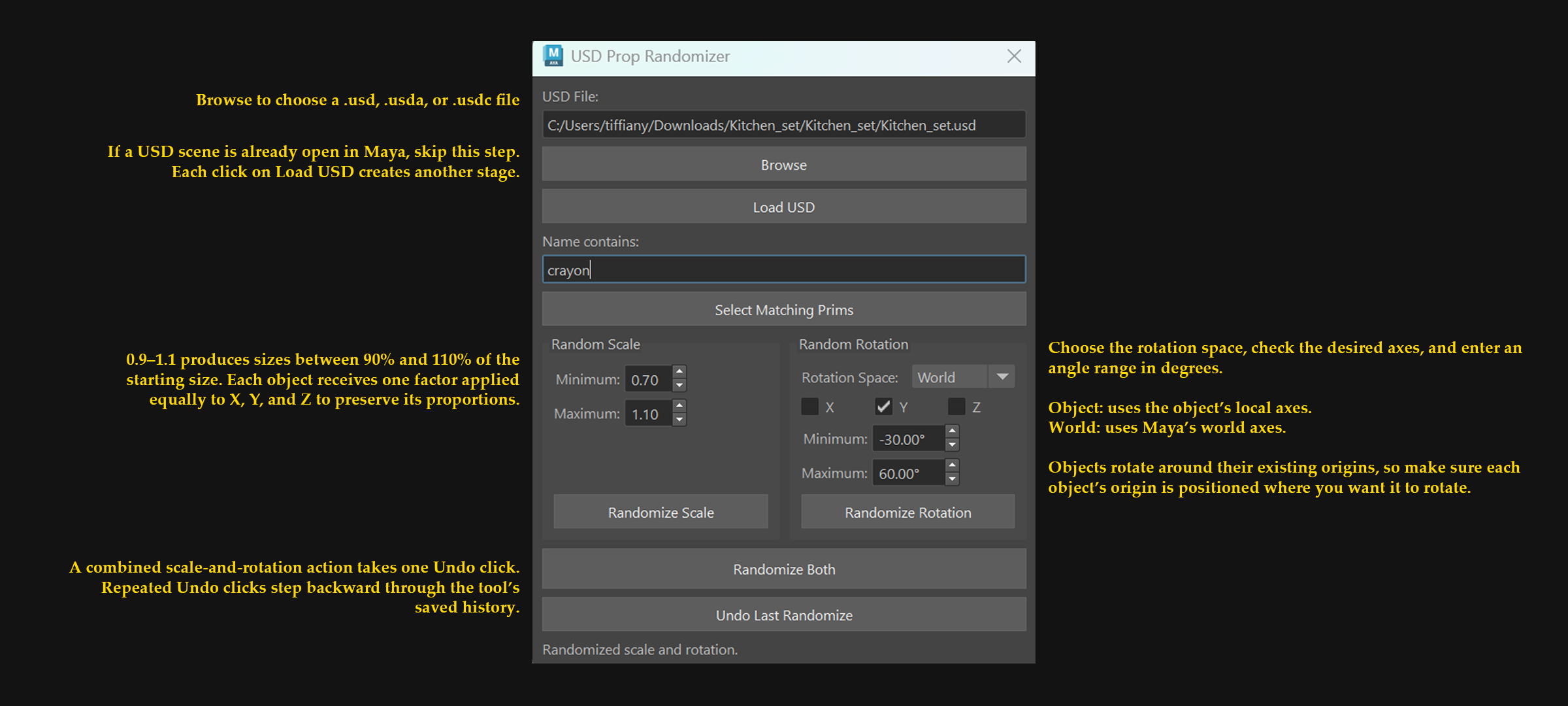
Test Scene
Tested in Maya 2027 using Pixar’s Kitchen Set, including selecting plate props by name and randomizing their transforms.
Download: https://openusd.org/release/dl_kitchen_set.html
Limitations
Intended for static USD props; animated transforms are not supported.
Edits are authored in the USD session layer. The tool does not save or export the modified stage to a USD file.
Undo applies only to actions recorded by this tool and is separate from Maya’s general undo history.
